22 / SOFTWARE
LinkPulse
See where your network hurts: latency and packet loss hop by hop, every device found, and an alert the moment something drops.
FREE DESKTOP APP
See where your network hurts.
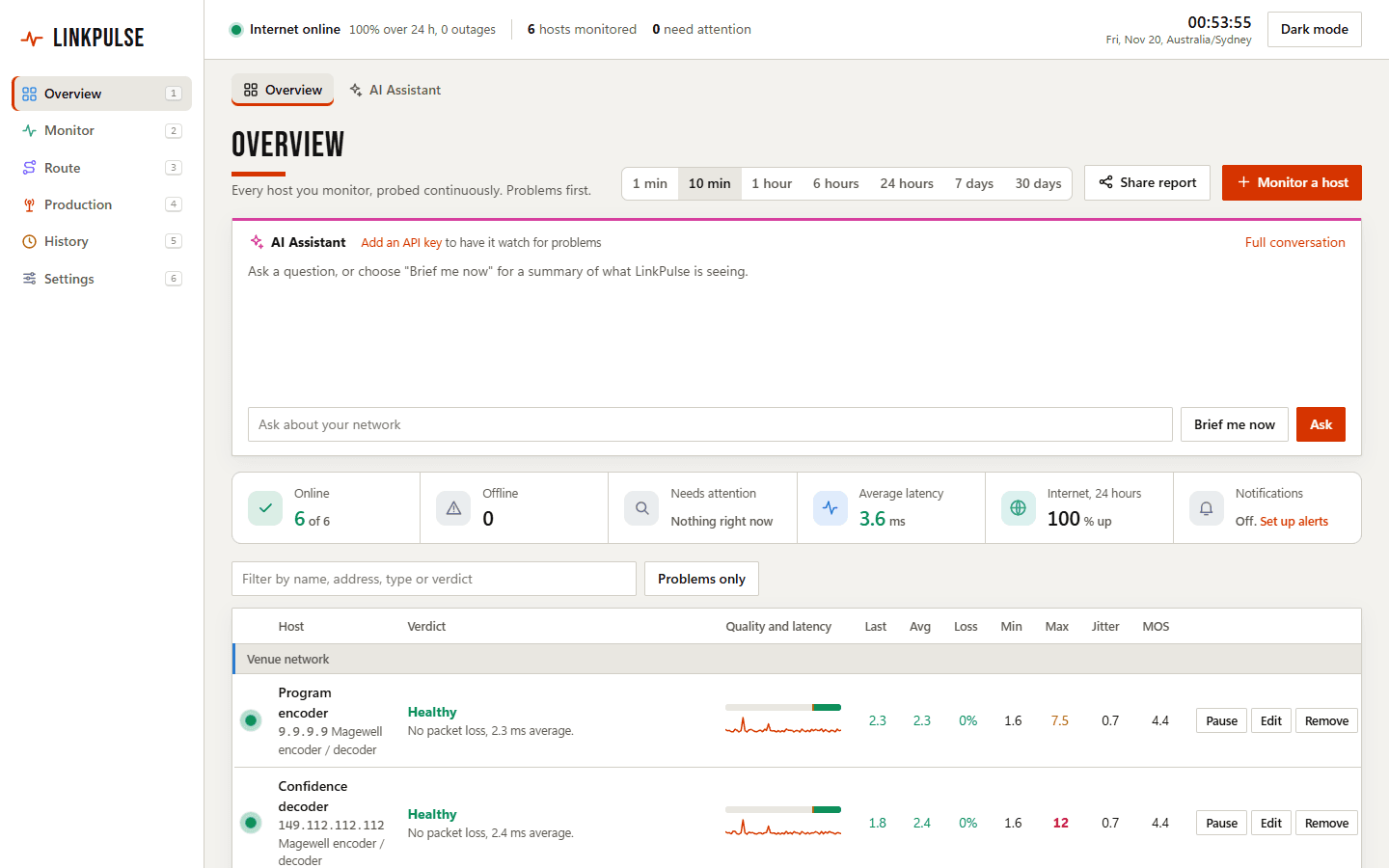
LinkPulse probes every device and route you depend on, graphs latency and packet loss hop by hop, and tells you in plain words where the trouble starts. Before a show, its Production page tests whether the venue network can carry what you are about to do. It runs as a desktop dashboard, a password-protected server or a live terminal view, from one file with no installer. Built for live events and broadcast; useful anywhere there is a network.
Version 0.6.0 · Windows · macOS · Linux
The shortcut is 1 to 6 by default. The number keys switch between the six menu sections: Overview, Monitor, Route, Production, History and Settings. Press ? for Help, which lists every keyboard shortcut and the command-line reference.
- What it solves
- A free network monitor in one file. It probes every host and route you depend on, graphs latency and packet loss hop by hop, finds the devices on your network and alerts you when something drops. Its Production page checks whether a venue network is ready for your show.
- Who it is for
- People who run or depend on a network and need to know where it is failing - live event, broadcast and AV crews, IT support, and anyone tracking down an unreliable connection.
- What is included
- Per-platform installers, with the first-run shortcut shown below.
- Supported platforms
- Windows · macOS · Linux
- Pricing and licence
- The monitor is free with no host limit; one sign-in with Google or email. LinkPulse Pro, a paid upgrade for the Production tools, is planned at A$149 once during early access and is not on sale yet.
- Data and privacy
- Monitoring data, settings and logs stay on your computer. Your name and email are kept from the sign-in, and anonymous usage counts are sent unless you switch them off in Settings.
- Support
- Feedback form; there is no guaranteed response time.
- Release status
- Released
Built from real production problems through MyEvent Productions. Visit MyEvent Productions
It tells you where the fault is
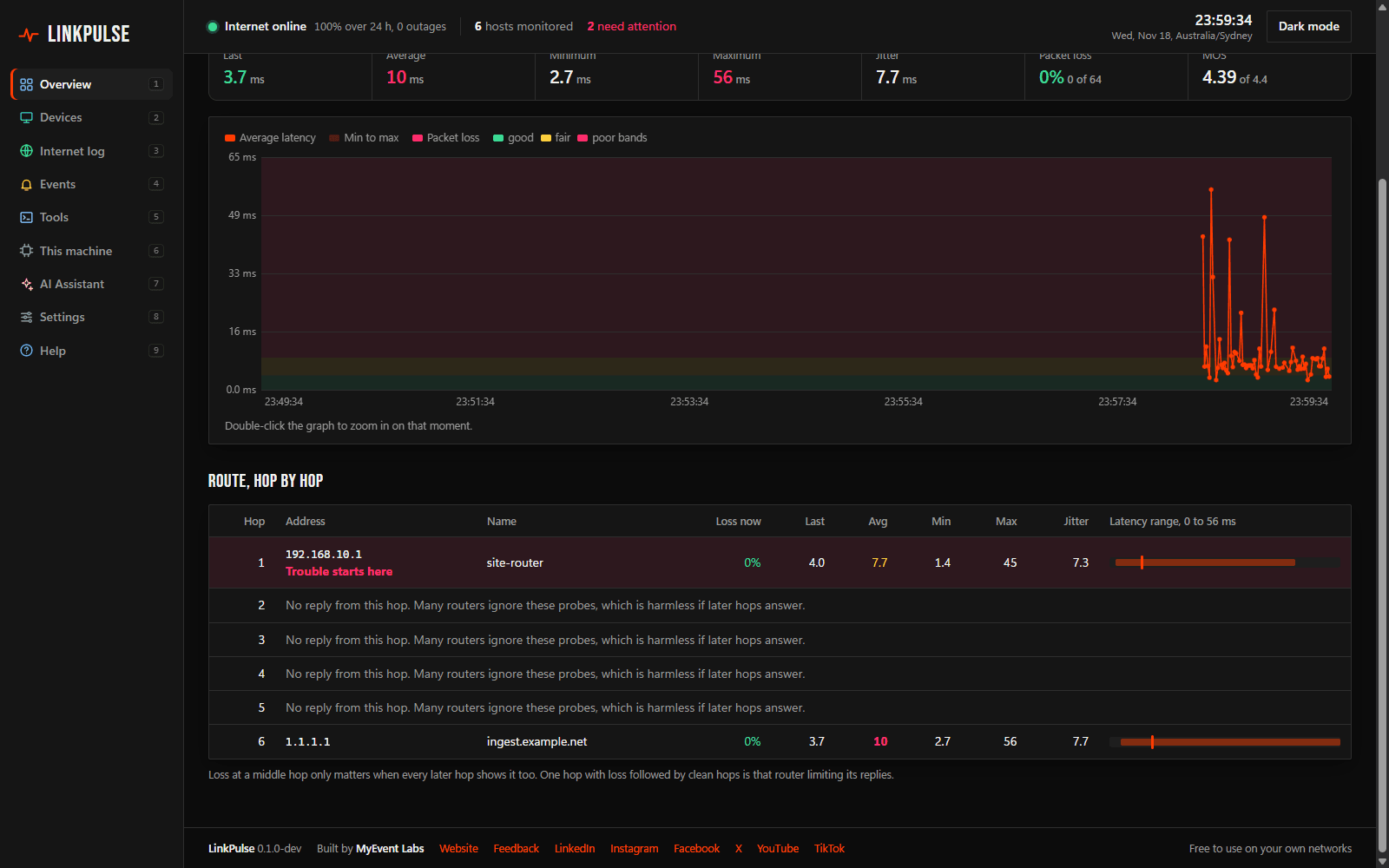
Every host gets a plain verdict, and a traced route shows latency and loss at each hop. Loss that starts at one hop and carries through to the destination points at that hop; loss at a middle hop that does not continue is flagged as harmless.
Know before you go live
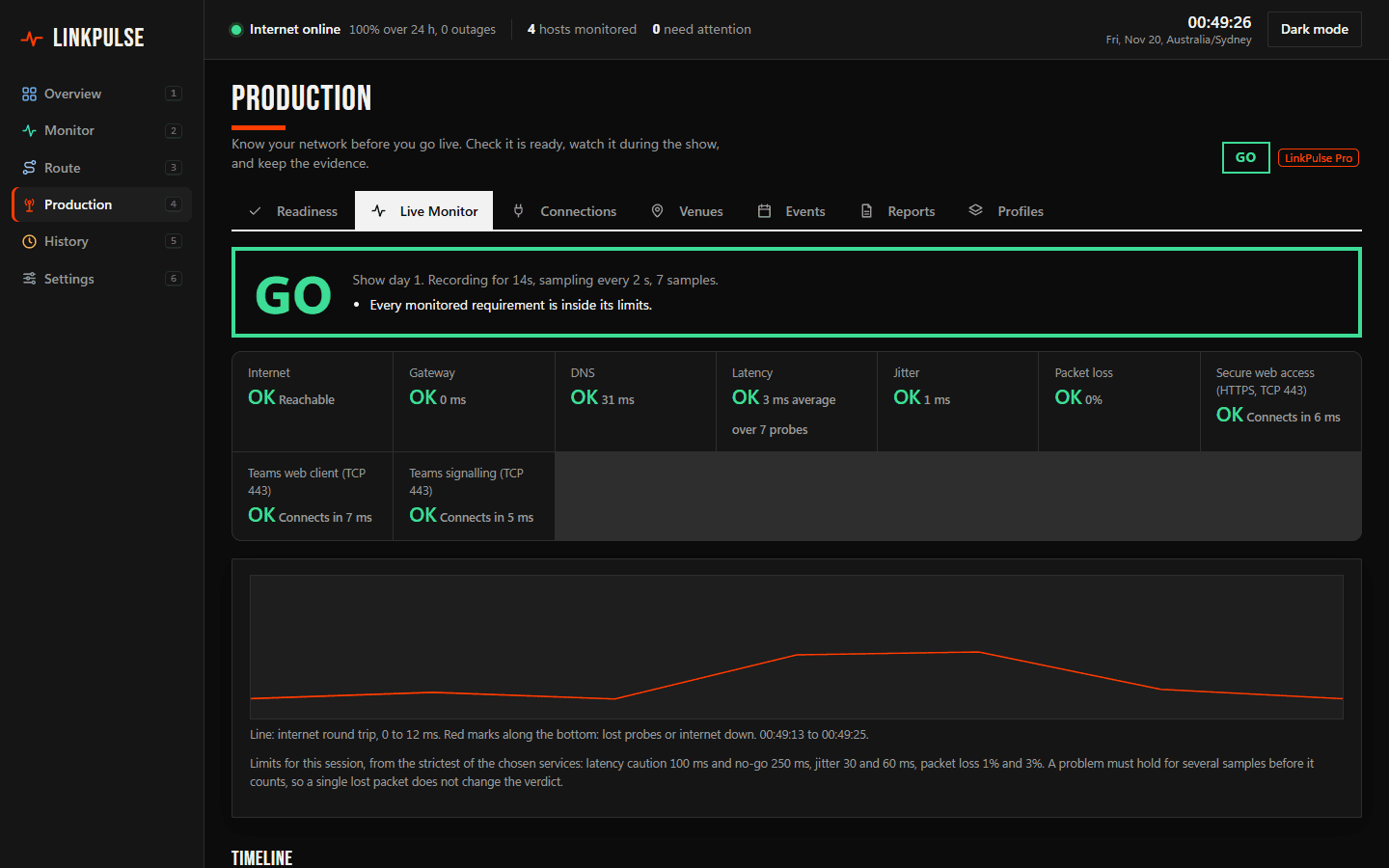
On the Production page, pick what you are about to do and LinkPulse tests what that job needs, then says whether the network is ready and what to ask venue IT to change. The network basics check is free. LinkPulse Pro adds stream destination and meeting platform tests, saved venues, an event recorder with a live GO, CAUTION or NO-GO verdict, and readiness and incident reports.
Every device, found and named
Scan a network and LinkPulse lists each device with its address, hardware vendor and likely type, then keeps rescanning on a schedule and marks what is new and what has gone.
Alerts where you already look
Email, Slack, Microsoft Teams, WhatsApp or a webhook when a host goes offline, the internet drops, or latency and loss cross the limits you set. A separate log records every internet outage with its start and length.
Thirty days of history and reports
One-minute history is kept for 30 days in plain CSV on your machine. Share any host or the whole network as a PDF, Excel, CSV, Markdown or web report, or email it straight from the app.
An assistant that reads the graphs
Add your own key from Anthropic, OpenAI, Google, OpenRouter or a local model and ask what is wrong in plain words. It answers in three lines: status, cause, and what to do.
Desktop, server or terminal
Run it on a laptop, on a server behind a password, in Docker, or as a live dashboard in the terminal. Other devices on the network can open the dashboard with a password and a QR code. It updates itself with signed releases.
- Sign in and download. On linkpulse.myevent-labs.io, choose your system: Windows, macOS or Linux, on Intel/AMD or ARM. The download asks you to sign in once, with Google or a six-digit code sent to your email, and then the file downloads.
- Clear the first launch. Builds are not code-signed yet. On Windows, double-click the file and choose More info, then Run anyway if SmartScreen appears. On macOS and Linux, open a terminal in your downloads folder, run chmod +x on the file, then run it; on macOS also clear the quarantine flag with xattr -d com.apple.quarantine.
- Add what you want watched. The dashboard opens in your browser and asks you to sign in once more on this computer; after that it works with no internet. Scan your network to find its devices, then choose Monitor a host for anything you want watched continuously.
Builds are not code-signed yet, so Windows SmartScreen and macOS Gatekeeper may ask you to confirm the first launch.
What stays on your machine
Your hosts, addresses, device names, settings and logs stay on your computer as plain CSV and JSON files; nothing about your network is sent to MyEvent Labs. Downloading and first use each ask for one sign-in, and we keep your name and email so we can tell you about updates and fixes. LinkPulse also sends anonymous usage counts (installs, launches, session length and which features are used), which one switch in Settings turns off. The AI assistant only runs with your own API key and sends your question and a snapshot of your monitoring data to the provider you choose.
The full privacy information covers the detail.
What does it cost?
The monitor is free, with no host limit: latency, loss and route monitoring, the network map, device scan, tools, alerts, reports and the network basics readiness check. You sign in once with Google or your email to download it and once more the first time it opens. LinkPulse Pro is a paid upgrade for the rest of the Production tools.
What does LinkPulse Pro add, and what will it cost?
Pro adds stream destination and meeting platform tests, saved venues, the event recorder with a live GO, CAUTION or NO-GO verdict, configuration requests for venue IT, and readiness, event and incident reports. Planned prices in Australian dollars, GST included: Pro A$149 once during early access (A$199 afterwards), Pro Cloud A$149 a year with sync between your computers, and Teams A$599 a year for up to five people with a shared library. The paid plans are not on sale yet; the app's Production page shows them when they are.
Which systems does it run on?
Windows 10 and 11, macOS and Linux, on both Intel/AMD and ARM processors. It is one file with no installer and no runtime to install. It monitors IPv4 hosts.
Does it need administrator rights?
Not on Windows or macOS. On Linux it uses unprivileged ping sockets where the system allows them and otherwise needs the right to open raw sockets.
Is anything about my network sent anywhere?
No. Monitoring data, settings and logs stay on your machine. The outbound traffic is the update check, anonymous usage counts you can switch off, the notification channels you set up yourself, the tests you run against your own stream destinations and meeting platforms, and the AI provider if you add your own key.
Can I open the dashboard from my phone?
Yes. Switch on Open on other devices in Settings, set a password, and scan the QR code from a phone or another computer on the same network. For access from outside your network, use a VPN: the dashboard is served over plain HTTP.
How do updates work?
LinkPulse checks for a newer version every 30 minutes and offers it in the dashboard. When you accept, it downloads the release, verifies its signature, replaces itself and restarts; your settings and history are kept.
What needs
to work better?
Discuss a digital project Bring us the problem. We’ll work through the possibilities together.