READY-TO-USE SOFTWARE
Loading this product.
Fetching the latest release details.
PLEASE WAIT
Live release information is being fetched. This should only take a moment.
READY-TO-USE SOFTWARE
Loading this product.
Fetching the latest release details.
PLEASE WAIT
Live release information is being fetched. This should only take a moment.
04 / SOFTWARE
A free tool that takes a YouTube URL and writes a 1080p MP4 to your Downloads folder - in the terminal or a local web app. Download is Free.
FREE TOOL - CLI AND LOCAL WEB APP
Labs YT Clip ships two small binaries for Windows · macOS · Linux: labs-ytclip for the terminal and labs-ytclip-web, a local web app that opens in your browser. Open your terminal, paste the line for your system and run it - it installs both and puts them on your PATH. It is free: no licence key and nothing to buy.
labs-ytclip and labs-ytclip-web on your PATH.labs-ytclip in the terminal, or labs-ytclip-web to use it in your browser.Latest: v0.1.7
curl -fsSL https://releases.myevent-labs.io/labs-ytclip/install.sh | shInstalls labs-ytclip and labs-ytclip-web into ~/.local/bin, with the pinned yt-dlp and ffmpeg stored in the app data folder (~/Library/Application Support/labs-ytclip on Mac, ~/.local/share/labs-ytclip on Linux). Then run labs-ytclip for the CLI or labs-ytclip-web for the browser app.
irm https://releases.myevent-labs.io/labs-ytclip/install.ps1 | iexInstalls labs-ytclip and labs-ytclip-web under $env:LOCALAPPDATA\Programs\labs-ytclip, with the pinned yt-dlp and ffmpeg stored in the app data folder $env:LOCALAPPDATA\labs-ytclip. Then run labs-ytclip for the CLI or labs-ytclip-web for the browser app.
Prefer to install by hand? The per-platform archive downloads and SHA256SUMS are below.
Confirm where labs-ytclip is, delete that install, confirm the command is gone, then run the same installer so you land on v0.1.7. After remove, Get-Command / command -v should not resolve the binary.
(Get-Command labs-ytclip).Source
Remove-Item -Recurse -Force "$env:LOCALAPPDATA\Programs\labs-ytclip"
Remove-Item -Recurse -Force "$env:LOCALAPPDATA\labs-ytclip"The first line prints the installed binary path. Then remove the install folder under $env:LOCALAPPDATA\Programs\labs-ytclip (typically C:\Users\Username\AppData\Local\Programs\labs-ytclip) and the data folder that holds downloaded sidecars. Re-run the Windows one-liner at the top of this page.
rm -f ~/.local/bin/labs-ytclip ~/.local/bin/labs-ytclip-web
rm -rf "$HOME/Library/Application Support/labs-ytclip"The install.sh one-liner places labs-ytclip and labs-ytclip-web in ~/.local/bin. Remove those files and the Application Support data folder, then re-run the macOS / Linux one-liner.
rm -f ~/.local/bin/labs-ytclip ~/.local/bin/labs-ytclip-web
rm -rf "$HOME/.local/share/labs-ytclip"The install.sh one-liner places labs-ytclip and labs-ytclip-web in ~/.local/bin. Remove those files and the ~/.local/share data folder, then re-run the macOS / Linux one-liner.
Built from real production problems through MyEvent Productions. Visit MyEvent Productions
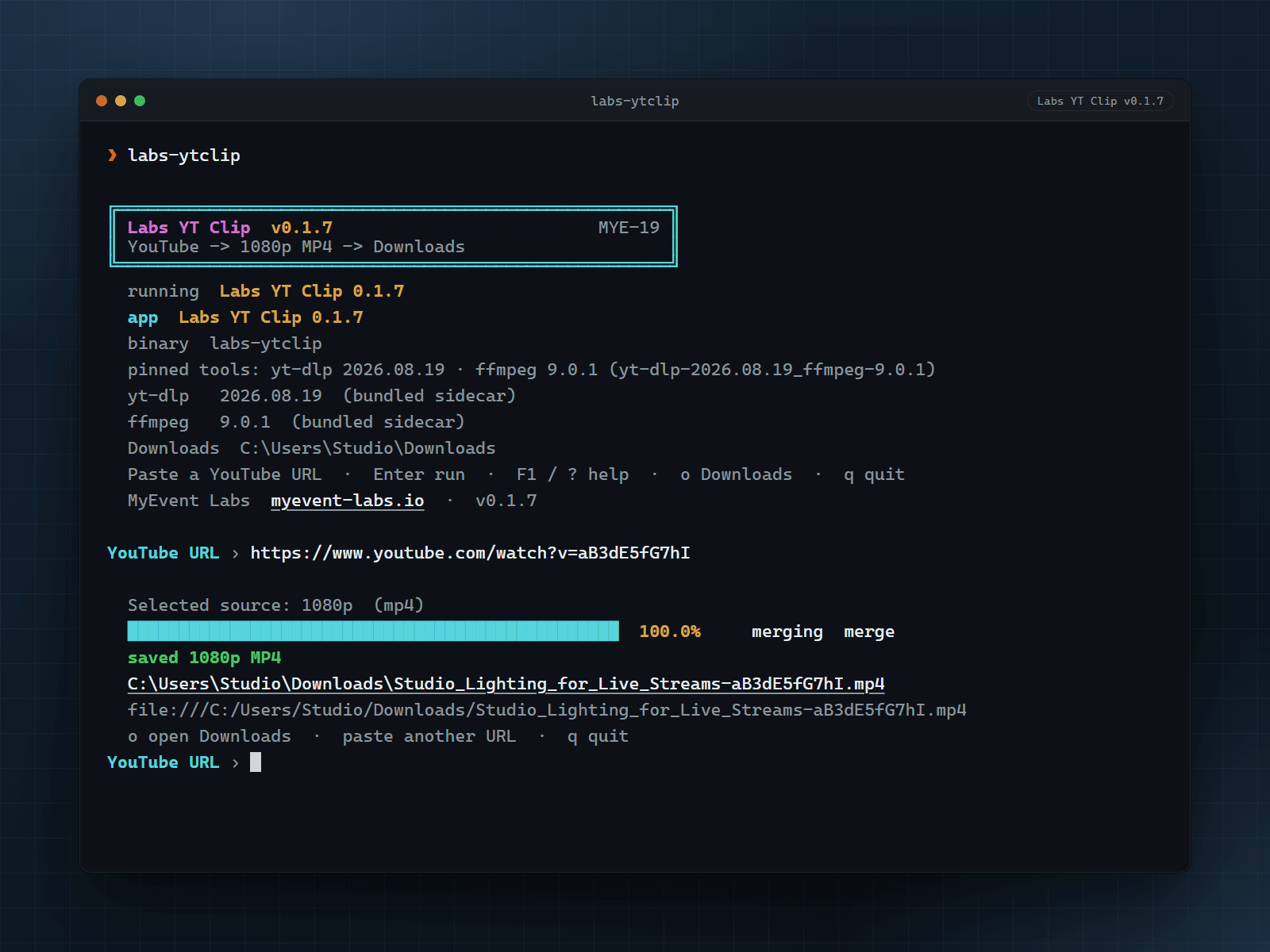
Paste a YouTube URL. Labs YT Clip uses bundled yt-dlp and ffmpeg to write a 1080p MP4 (or the best stream at or below 1080p when 1080p is not offered) into your Downloads folder. No brew, winget or apt step.
The same install gives you two apps. labs-ytclip is the fast, scriptable CLI. labs-ytclip-web is a local companion that opens http://127.0.0.1:7431/ in your browser with a responsive UI, live progress, the Getting Started guide and an in-app update banner. Same pipeline, same rules.
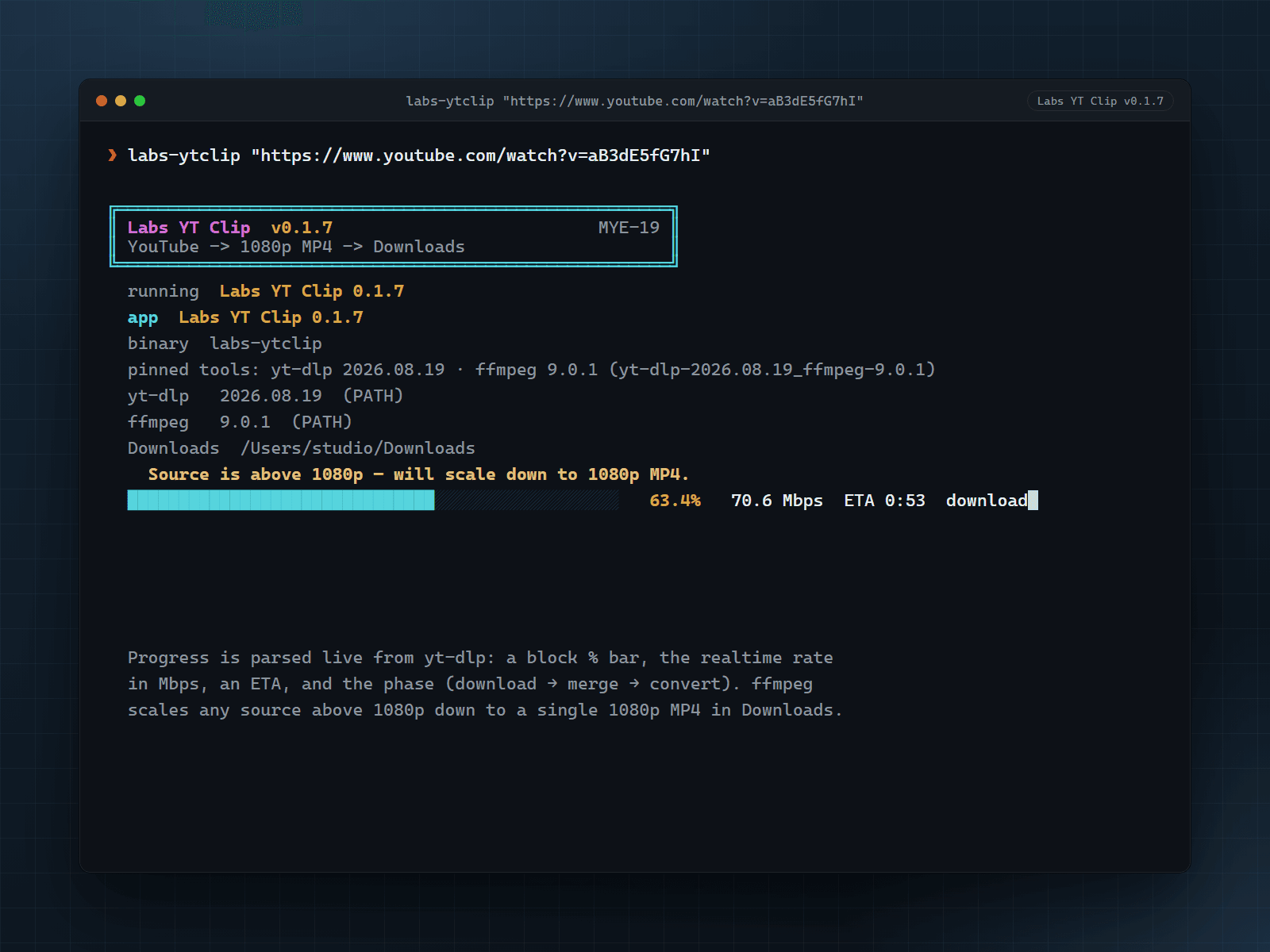
A block % bar with the realtime speed in Mbps and a live ETA, plus the phase (download, merge, convert) parsed live from yt-dlp - in the terminal and in the web app. When it finishes, a local file link and a folder link open the result.
Your video never leaves your machine: files land only in your Downloads folder, only YouTube hosts are accepted, and the tools are invoked as argv (never a shell). Anonymous usage counters go to MyEvent Labs and can be switched off - see the privacy answer below. The web app binds to loopback only and rejects foreign Host headers and cross-origin requests.
The running version is in the banner. Press F1 or ? for Getting Started, or run labs-ytclip --getting-started; labs-ytclip --version prints the app plus the resolved yt-dlp and ffmpeg versions. https://www.myevent-labs.io is an OSC-8 link in capable terminals.
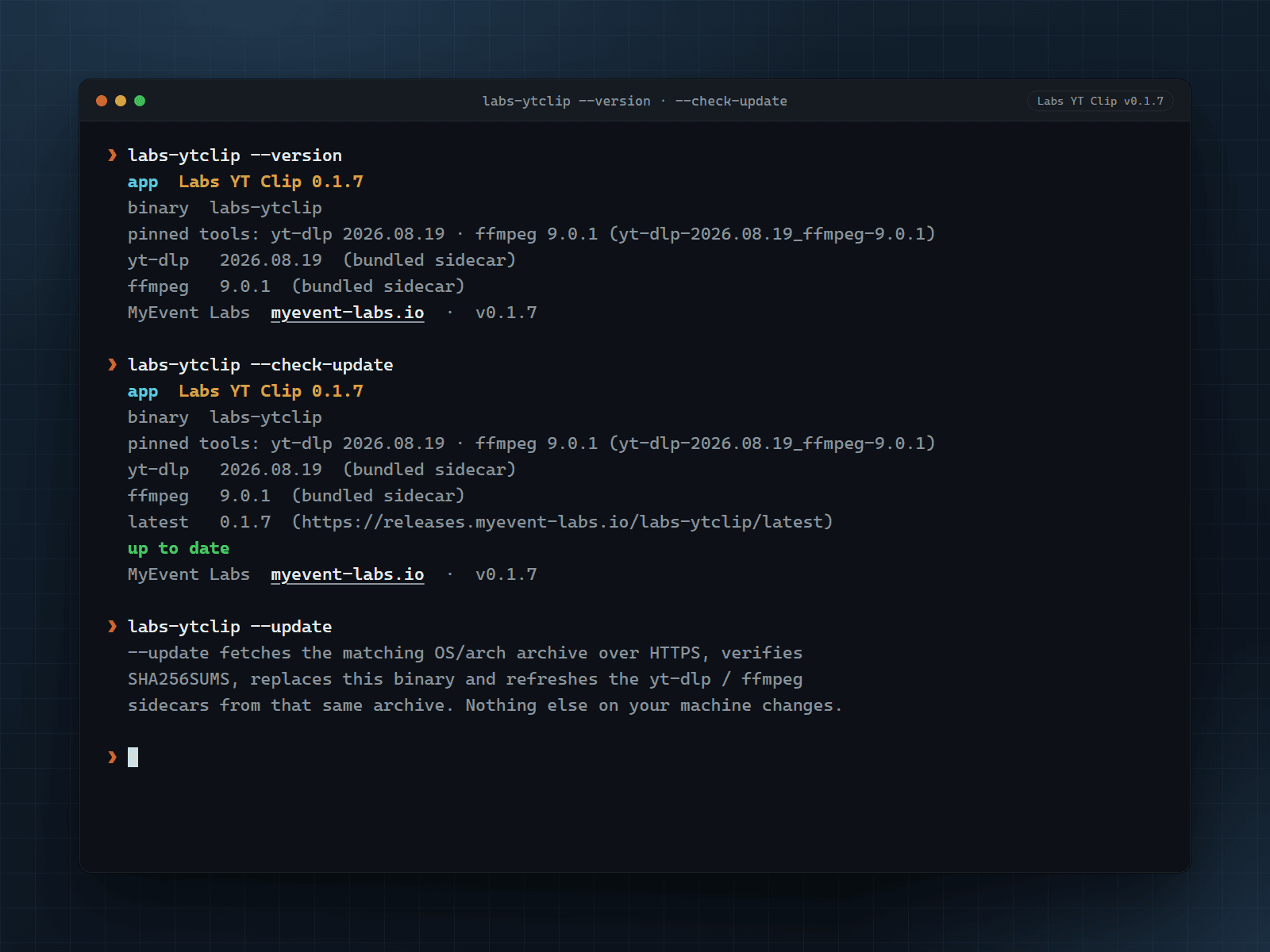
labs-ytclip --check-update tells you if a newer cut exists; labs-ytclip --update fetches it from the CDN, verifies it against SHA256SUMS, then replaces the binary and refreshes yt-dlp and ffmpeg too. The web app shows an Update available - Install and restart banner that does the same.
| Key or command | What it does |
|---|---|
F1 or ? | Toggle the Getting Started overlay while Labs YT Clip is running (CLI and web app). |
o | Open your Downloads folder after a run (CLI and web app). |
labs-ytclip --getting-started | Print the Getting Started guide and exit. |
labs-ytclip --version | Print the app version plus the resolved yt-dlp and ffmpeg versions, then exit. |
labs-ytclip --check-update | Check the CDN for a newer cut without installing it. |
labs-ytclip --update | Self-update from the CDN, verify SHA256SUMS, then replace the binary and refresh the bundled tools. |
labs-ytclip-web | Start the local web app and open http://127.0.0.1:7431/ in your default browser. |
labs-ytclip-web --no-open | Start the local web app and print the URL only. |
labs-ytclip-web --port 8080 | Pick another loopback port for the local web app. |
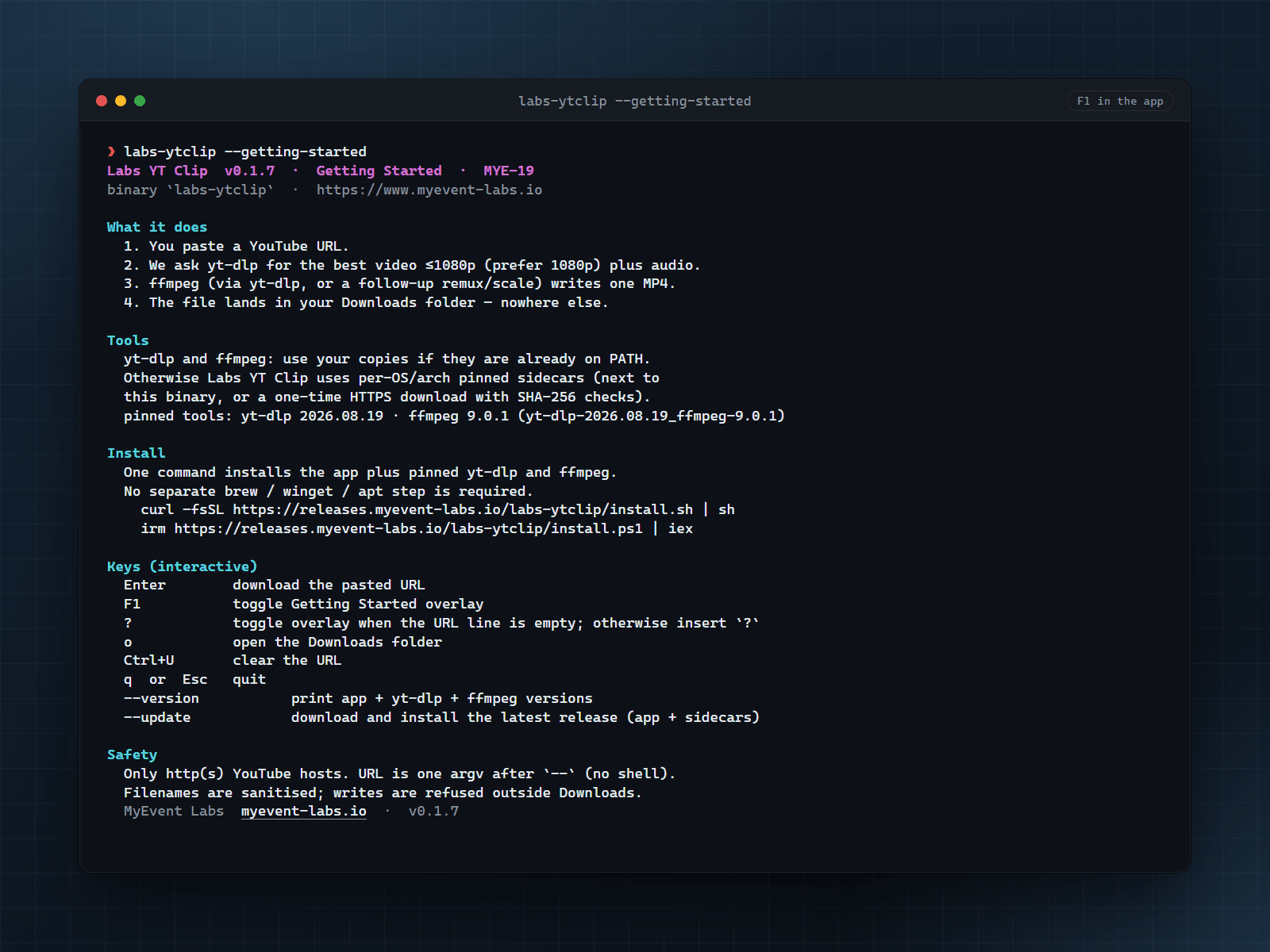
Labs YT Clip  v0.1.7  ·  Getting Started  ·  MYE-19
binary `labs-ytclip`  ·  https://www.myevent-labs.io

What it does
  1. You paste a YouTube URL.
  2. We ask yt-dlp for the best video ≤1080p (prefer 1080p) plus audio.
  3. ffmpeg (via yt-dlp, or a follow-up remux/scale) writes one MP4.
  4. The file lands in your Downloads folder - nowhere else.

Tools
  yt-dlp and ffmpeg: use your copies if they are already on PATH.
  Otherwise Labs YT Clip uses per-OS/arch pinned sidecars (next to
  this binary, or a one-time HTTPS download with SHA-256 checks).
  pinned tools: yt-dlp 2026.08.19 · ffmpeg 9.0.1 (yt-dlp-2026.08.19_ffmpeg-9.0.1)

Install
  One command installs the app plus pinned yt-dlp and ffmpeg.
  No separate brew / winget / apt step is required.
    curl -fsSL https://releases.myevent-labs.io/labs-ytclip/install.sh | sh
    irm https://releases.myevent-labs.io/labs-ytclip/install.ps1 | iex

Try it
  labs-ytclip "https://www.youtube.com/watch?v=VIDEO_ID"

Safety
  Only http(s) YouTube hosts. URL is one argv after `--` (no shell).
  Filenames are sanitised; writes are refused outside Downloads.
  Playlists are not expanded (`--no-playlist`).

Updates
  labs-ytclip --version         app + yt-dlp + ffmpeg versions
  labs-ytclip --check-update    CDN/GitHub latest (HTTPS)
  labs-ytclip --update          install latest app + sidecars (HTTPS + SHA256SUMS)

  MyEvent Labs  myevent-labs.io  ·  v0.1.7
A trimmed sample of the guide printed by labs-ytclip --getting-started (F1 in the app) for v0.1.7. The live overlay in the running app is the source of truth.
Prefer to install by hand? Download the archive for your platform, verify it against SHA256SUMS, then unpack and run it yourself. The one-line installer at the top of the page does this for you.
Verify your download against SHA256SUMS. Compute the SHA-256 of the file you downloaded and confirm it matches the line for that file name.
Once downloaded, unpack the archive and run labs-ytclip from your terminal. On Windows, unzip the .zip and run labs-ytclip.exe, or add it to your PATH. Builds are not code-signed, so Windows SmartScreen and macOS Gatekeeper may ask you to confirm the first launch.
Open your terminal and paste the one-line install script for your system: on macOS or Linux run "curl -fsSL https://releases.myevent-labs.io/labs-ytclip/install.sh | sh", and on Windows PowerShell run "irm https://releases.myevent-labs.io/labs-ytclip/install.ps1 | iex". It installs everything - Labs YT Clip, the labs-ytclip-web companion, plus bundled yt-dlp and ffmpeg - and puts them on your PATH, so you then just type labs-ytclip to run it in the terminal, or labs-ytclip-web to use it in your browser. No brew, winget or apt step. Prefer to install by hand? Download the build for your platform from the downloads on this page, unpack the archive, and run labs-ytclip (on Windows, unzip the .zip and run labs-ytclip.exe). There is no installer to click through and no licence key.
No, and that is deliberate. The web app, labs-ytclip-web, ships in the same archive as the CLI and runs on your machine. Run it and it opens http://127.0.0.1:7431/ in your default browser - a responsive UI with live progress, the Getting Started guide and an Update available - Install and restart banner. Your downloads land in your own Downloads folder; no video, URL, title, filename or path is ever uploaded, and there is no shared infrastructure running yt-dlp or ffmpeg for everyone. The server binds to loopback only, rejects foreign Host headers and cross-origin POSTs, and never exposes anything to your network. The product site at https://labs-ytclip.app is a download page, not a hosted downloader.
Anonymous usage counters, and only those. Labs YT Clip reports five events to the MyEvent Labs telemetry service: install_success, app_opened, clip_started, clip_completed (duration, byte count and video height) and error_occurred (a machine code plus a category such as network or io). Every event carries a random install id, a random per-run session id, the app version, your operating system name and your CPU architecture. No YouTube URL, video title, video id, filename, path, email address, account or hardware id is ever sent, error events never carry a message or stack trace, and no video or file content leaves your machine. It is on by default, matching the other MyEvent Labs apps, and you can switch it off: set the environment variable LABSYTCLIP_TELEMETRY to 0 (it also accepts false, off or no), or set the enabled flag to false in the telemetry.json state file in the app config folder. Nothing is queued or sent while it is off, and a build with no key compiled in never contacts the service at all. The random install id is stored locally in that same state file, so deleting the folder starts you over as a new anonymous install.
Every release publishes a SHA256SUMS manifest next to the downloads. After downloading, compute the SHA-256 of your file and confirm it matches the line for that file name - on macOS or Linux with "shasum -a 256 <file>", and on Windows with "certutil -hashfile <file> SHA256". Only the official archives listed on this page are supported. The install scripts refuse to proceed if SHA256SUMS is missing, the hash does not match, or the archive has no bundled yt-dlp and ffmpeg.
From a terminal run "labs-ytclip --check-update" to see if a newer cut exists, then "labs-ytclip --update" to install it. It fetches the matching build from the CDN over HTTPS, verifies SHA256SUMS, replaces the binary and refreshes the bundled yt-dlp and ffmpeg too. In the web app, the footer shows the running version and an Update available banner appears when a newer cut is published; Install and restart runs the same verified update. The install one-liners on this page are unchanged - they still install labs-ytclip and put it on your PATH.
No. The one-line installer ships Labs YT Clip with bundled yt-dlp and ffmpeg pinned for this release, so a fresh install does not need brew, winget or apt. If those tools are already on your PATH, Labs YT Clip prefers the copies on PATH.
On Windows PowerShell, print (Get-Command labs-ytclip).Source, then Remove-Item the folder under $env:LOCALAPPDATA\Programs\labs-ytclip (for example C:\Users\Username\AppData\Local\Programs\labs-ytclip) and the data folder $env:LOCALAPPDATA\labs-ytclip. On Mac and Linux, remove ~/.local/bin/labs-ytclip and ~/.local/bin/labs-ytclip-web (the install.sh location) plus the data folder (~/Library/Application Support/labs-ytclip on Mac, ~/.local/share/labs-ytclip on Linux), then re-run the one-liner for your system.
Give it a YouTube URL. It writes a 1080p MP4 (or the best stream at or below 1080p) to your Downloads folder using bundled yt-dlp and ffmpeg, shows a block progress bar with the speed in Mbps, a live ETA and the phase, and offers a local file and folder link when the run finishes. It accepts YouTube hosts only, invokes tools as argv (never a shell) and writes only under Downloads. Run labs-ytclip --version for the running version, or labs-ytclip --getting-started (F1 in the app) for usage; the footer is https://www.myevent-labs.io.
Download is Free. There is no licence key and nothing to buy. Labs YT Clip is MIT-licensed Rust; the redistributed yt-dlp (Unlicense) and ffmpeg (GPL) builds keep their own terms, listed in the NOTICE file that ships with each release. The prebuilt downloads are free on this page; the source repository is currently private, but you do not need it to download and run the tool.
Bring us the problem. We’ll work through the possibilities together.